
ThedailyID
  • Home
  • Indonesia
  • Global
  • Business
  • Lifestyle
  • Tech
  • Sports
  • Photo
  • Who Is ?
No Result
View All Result
ThedailyID
  • Home
  • Indonesia
  • Global
  • Business
  • Lifestyle
  • Tech
  • Sports
  • Photo
  • Who Is ?
No Result
View All Result
ThedailyID
No Result
View All Result
  • Home
  • Indonesia
  • Global
  • Business
  • Lifestyle
  • Tech
  • Sports
  • Photo
  • Who Is ?

Android Users Can Now Send Files Directly to iPhones With Quick Share

Nurul Darari by Nurul Darari
June 28, 2026
in Tech
Reading Time: 2 mins read
Android Users Can Now Send Files Directly to iPhones With Quick Share

Android Users Can Now Send Files Directly to iPhones With Quick Share

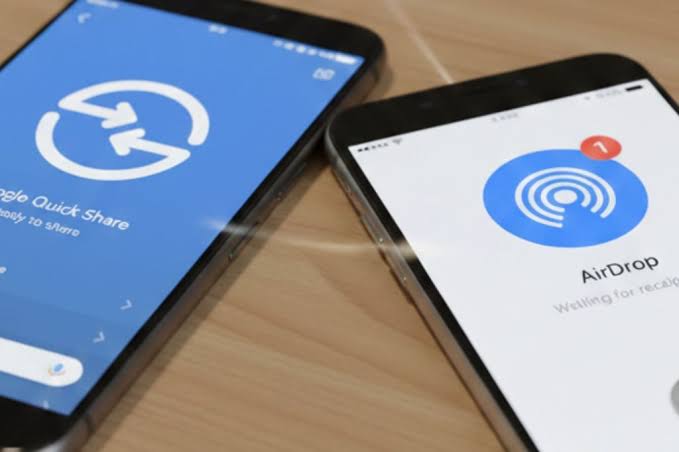
Jakarta, ThedailyID — Android users can now send photos, videos, and other files directly to iPhones using Google’s Quick Share feature, eliminating the need for third-party apps. The new capability bridges file sharing between Android and Apple’s AirDrop ecosystem.

Google first introduced the feature with the Pixel 10 series in November 2025. Since early 2026, the company has expanded support to more Android devices from several manufacturers.

You might also like

UK Faces Water Supply Concerns as AI Data Center Expansion Accelerates

UK Faces Water Supply Concerns as AI Data Center Expansion Accelerates

July 22, 2026
XLSMART Bundles Google Gemini AI with XL, AXIS, and SMARTFREN Internet Plans

XLSMART Bundles Google Gemini AI with XL, AXIS, and SMARTFREN Internet Plans

July 21, 2026

The feature works much like AirDrop. Both devices must have Bluetooth and Wi-Fi enabled, remain within close range, and complete the transfer locally.

To send files from Android to an iPhone, users need to open the file, tap Share, and select Quick Share. On the receiving iPhone, AirDrop visibility must be set to “Everyone for 10 Minutes” through the Control Center. Once the iPhone appears in the Quick Share menu, the recipient accepts the request and the transfer begins automatically.

Samsung users must first enable the “Share with Apple devices” option in the Quick Share settings before starting the transfer.

Sending files from an iPhone to an Android device follows a similar process. Users select the file, choose AirDrop, and pick the Android device from the list. The Android device must have Quick Share enabled in receive mode, while Samsung devices also require the Apple sharing option to be turned on.

For Android devices that do not support the feature, Google offers an alternative through QR codes. Users can generate a QR code from Quick Share, which iPhone users scan with the Camera app. The browser then opens a download page where the file can be saved. Unlike direct transfers, this method requires an internet connection.

According to 9to5Google, supported devices currently include the Google Pixel 8a, Pixel 9 series, and Pixel 10 lineup. Samsung compatibility starts with devices running One UI 8.5, including the Galaxy S24, S25, S26, Z Fold 6 and 7, and Z Flip 6 and 7.

Other supported models include the Xiaomi 17T Pro, OnePlus 15, Oppo Find X9 series and Find N6, Vivo X300 series, and Honor Magic V6. Google is expected to expand compatibility to additional Android devices over time.

Tags: AirDropAndroidappleGoogleiphonePixelQuick ShareSamsungTechnologyThedailyID
Previous Post

Iran Crash Out of FIFA World Cup 2026 After Austria’s Last-Gasp Equalizer

Next Post

Purbaya to Allocate 80% of LPDP Scholarships to STEM Fields From 2026

Related Stories

UK Faces Water Supply Concerns as AI Data Center Expansion Accelerates

UK Faces Water Supply Concerns as AI Data Center Expansion Accelerates

July 22, 2026
XLSMART Bundles Google Gemini AI with XL, AXIS, and SMARTFREN Internet Plans

XLSMART Bundles Google Gemini AI with XL, AXIS, and SMARTFREN Internet Plans

July 21, 2026
AI Models May Form Stronger Hiring Stereotypes Than People, Study Warns

AI Models May Form Stronger Hiring Stereotypes Than People, Study Warns

July 21, 2026
How to Free Up Storage Space on Android and iPhone

How to Free Up Storage Space on Android and iPhone

July 20, 2026
Next Post
Purbaya to Allocate 80% of LPDP Scholarships to STEM Fields From 2026

Purbaya to Allocate 80% of LPDP Scholarships to STEM Fields From 2026

ThedailyID

© 2026 ThedailyID - Indonesia, As It Happens

Navigate Site

  • Privacy
  • Cyber Media Guidelines
  • Editorial
  • About Us

Follow Us

No Result
View All Result
  • Home
  • Indonesia
  • Global
  • Business
  • Lifestyle
  • Tech
  • Sports
  • Photo
  • Who Is ?

© 2026 ThedailyID - Indonesia, As It Happens